Browse Projects
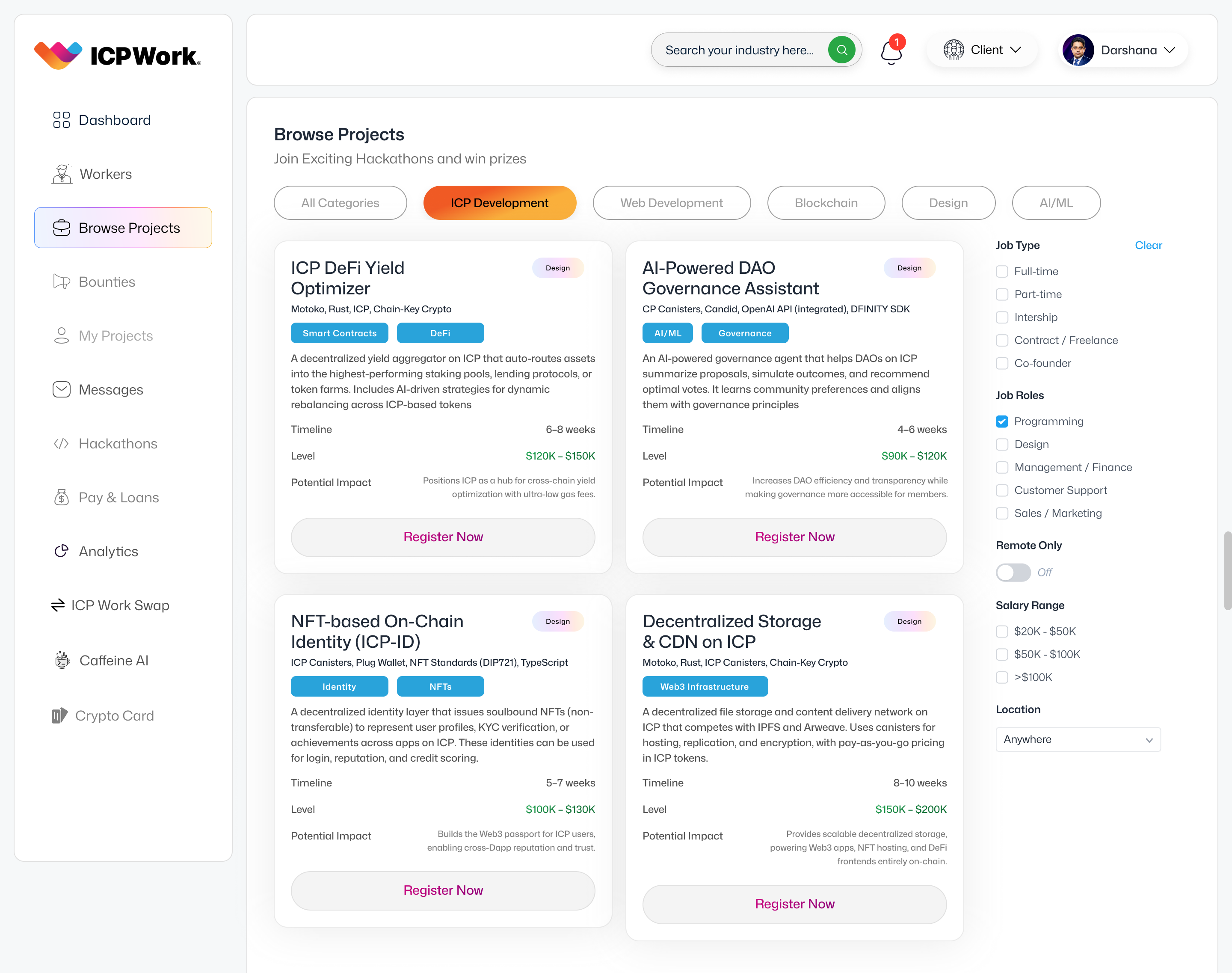
The 'Browse Projects' section of the ICPWork platform is a pivotal feature designed to connect freelancers with a diverse array of work opportunities. This section serves as a dynamic marketplace where clients can post their project requirements, and freelancers can actively search, filter, and apply for engagements that align with their skills, experience, and professional aspirations. The design of this interface prioritizes clarity, efficiency, and user-centric navigation, ensuring that both clients and freelancers can easily find what they are looking for within the decentralized ecosystem.
Strategic Importance
For freelancers, the 'Browse Projects' section is their primary gateway to earning opportunities. It provides a transparent and accessible list of available work, fostering a meritocratic environment where talent can directly engage with demand. For clients, it offers a streamlined process to attract and vet qualified professionals for their specific needs, leveraging the platform's global talent pool. The strategic importance of this section lies in its ability to facilitate efficient matching between supply and demand in the freelance market, thereby driving platform activity, user engagement, and ultimately, the success of the ICPWork ecosystem. It reduces friction in the hiring process, allowing projects to commence faster and with greater confidence in the selected talent.
User Interface (UI) and Key Features
The user interface of the 'Browse Projects' section is meticulously crafted to enhance the user experience. It features a clean, intuitive layout that allows for quick scanning and detailed examination of project listings. Key features include:
Advanced Search and Filtering
At the top of the page, a prominent search bar enables freelancers to input keywords related to project titles, descriptions, or required skills. Complementing the search bar is a comprehensive set of filter options, typically located on the left-hand side or as a collapsible menu. These filters allow users to refine their search based on various criteria, such as:
- Project Categories: (e.g., 'Smart Contracts', 'Frontend Development', 'Backend Development', 'UI/UX Design', 'Content Writing', 'Marketing')
- Budget Range: Allowing freelancers to set minimum and maximum project budgets they are willing to consider.
- Project Type: (e.g., 'Fixed Price', 'Hourly', 'Milestone-based')
- Skills Required: Enabling filtering by specific technical or soft skills.
- Experience Level: (e.g., 'Entry-Level', 'Intermediate', 'Expert')
- Client Rating/Reputation: To help freelancers identify reliable clients.
- Project Duration: (e.g., 'Short-term', 'Long-term', 'Ongoing')
These filtering capabilities are crucial for freelancers to efficiently navigate the multitude of available projects and focus on those that best fit their profile and preferences.
Project Listing Cards
Each project is presented as a concise, information-rich card, designed to provide essential details at a glance. A typical project card includes:
- Project Title: A clear and descriptive title that summarizes the project.
- Brief Description: A short excerpt from the project's full description, highlighting key aspects.
- Budget/Rate: Clearly stating the client's proposed budget or hourly rate.
- Required Skills: A list of key skills the client is looking for.
- Client Information: Often includes the client's name (or pseudonym), rating, and number of projects posted.
- Time Posted: Indicating how recently the project was listed.
- Application Deadline: If applicable, the date by which freelancers must submit their proposals.
- Call to Action: A prominent button (e.g., 'View Details', 'Apply Now') that leads to the full project description page.
These cards are designed to be easily scannable, allowing freelancers to quickly assess the relevance and attractiveness of a project before diving into its full details.
Project Detail Page
Clicking on a project card leads to a dedicated project detail page, which provides a comprehensive overview. This page typically includes:
- Full Project Description: A detailed breakdown of the project scope, deliverables, and objectives.
- Client Requirements: Specific skills, experience, and qualifications expected from the freelancer.
- Milestones and Deliverables: For milestone-based projects, a clear outline of each phase.
- Communication Tools: Integrated messaging or collaboration features for direct interaction with the client.
- Proposal Submission Form: A structured form for freelancers to submit their bids, cover letters, and portfolios.
- Q&A Section: Where freelancers can ask questions and clients can provide clarifications.
Technical Considerations
From a technical standpoint, the 'Browse Projects' functionality relies heavily on several ICP canisters. The Project Management Canister stores all project listings, including descriptions, requirements, and status. The User Management Canister holds freelancer profiles and client information, which are used for matching and display. An Indexing Canister likely processes and indexes project data to enable efficient search and filtering capabilities. The platform would also leverage the Payment Escrow Canister for managing project funds and ensuring secure transactions once a project is awarded. The modular and decentralized nature of ICP ensures that project data is secure, transparent, and readily accessible while maintaining high performance and scalability.
Conclusion
The 'Browse Projects' section is fundamental to the ICPWork platform's mission of connecting talent with opportunity. By providing a robust, intuitive, and transparent marketplace for projects, it empowers freelancers to find meaningful work and enables clients to access a global pool of skilled professionals. Its user-centric design and reliance on the secure, decentralized infrastructure of the Internet Computer Protocol make it a cornerstone of the ICPWork ecosystem, fostering a vibrant and efficient freelance economy.