Dashboard
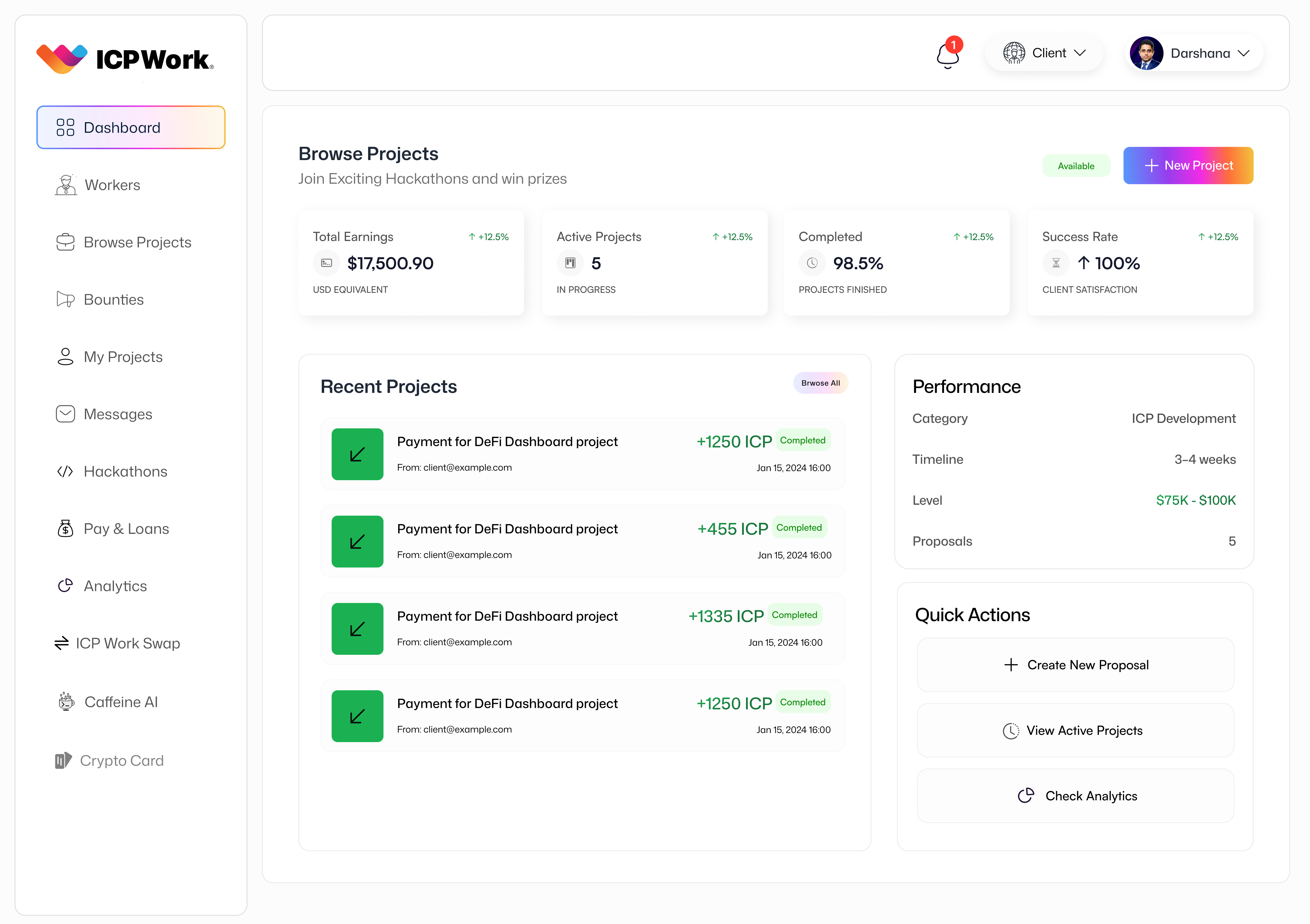
The Dashboard on the ICPWork platform serves as the personalized home screen for every user, whether they are a freelancer or a client. It is meticulously designed to provide an immediate, high-level overview of their most critical activities, notifications, and key performance indicators (KPIs) upon login. More than just a landing page, the Dashboard acts as a command center, offering quick access to essential features and insights tailored to the user's role and recent interactions. Its primary purpose is to enhance user efficiency by presenting relevant information upfront, minimizing the need to navigate through multiple sections to find crucial updates or tasks.
Strategic Importance
The strategic importance of the Dashboard lies in its ability to provide a personalized and efficient starting point for every user's journey on ICPWork. For freelancers, it offers a snapshot of their project statuses, earnings, pending tasks, and new opportunities, enabling them to manage their workload effectively and respond promptly to client communications. For clients, it provides an overview of their active projects, proposals received, budget utilization, and team performance, facilitating seamless project management and decision-making. By consolidating vital information and providing intuitive navigation, the Dashboard significantly improves user engagement and retention, making the platform indispensable for their professional needs. It also serves as a central hub for announcements and personalized recommendations, ensuring users stay informed and connected to the broader ICPWork ecosystem.
User Interface (UI) and Key Features
The Dashboard's user interface is crafted with a focus on clarity, accessibility, and personalization. It employs a modular design, allowing for various widgets and information panels to be arranged logically, ensuring that the most important data is immediately visible. Key features typically include:
Personalized Welcome and Overview
Upon logging in, users are greeted with a personalized welcome message and a summary of their overall activity. This might include a quick glance at their current balance, active projects, and pending notifications. This immediate feedback helps users quickly orient themselves and understand their current standing on the platform.
Project Status and Milestones
For both freelancers and clients, the Dashboard prominently displays the status of active projects. This includes progress bars, upcoming milestones, and deadlines. Freelancers can see which tasks require their immediate attention, while clients can monitor the advancement of their commissioned work. This feature ensures transparency and keeps all parties aligned on project timelines.
Financial Summary
A concise financial summary provides users with an overview of their earnings (for freelancers) or spending (for clients). This can include current wallet balance, recent transactions, and pending payments. For freelancers, this often links directly to the 'Payments & Loans' or 'ICP Work Swap' sections for further financial management.
Notifications and Alerts
The Dashboard serves as a central hub for all platform notifications, including new messages, project updates, proposal responses, and system announcements. These alerts are often categorized or prioritized to help users quickly identify and address critical information, ensuring they never miss an important interaction.
Quick Access to Key Features
Strategically placed shortcuts or widgets provide one-click access to frequently used sections of the platform, such as 'Messages', 'My Projects', 'Browse Projects', or 'Bounties'. This streamlines navigation and reduces the time spent searching for specific functionalities.
Recommendations and Insights
Leveraging data analytics and potentially Caffeine AI, the Dashboard can offer personalized recommendations. For freelancers, this might include suggested projects based on their skills, or tips for optimizing their profile. For clients, it could be recommendations for top-rated freelancers or insights into market trends relevant to their industry.
Technical Considerations
The Dashboard's functionality relies on a sophisticated integration of various ICP canisters. The User Management Canister provides personalized user data and preferences. The Project Management Canister feeds real-time project statuses and milestones. The Payment Escrow Canister supplies financial summaries and transaction data. A dedicated Notification Canister manages and delivers alerts. Furthermore, an Analytics Canister processes user activity to generate personalized insights and recommendations. The modular architecture of ICP ensures that the Dashboard can aggregate and display complex data from multiple sources securely and efficiently, providing a seamless and responsive user experience.
Conclusion
The Dashboard is a critical component of the ICPWork platform, acting as the personalized gateway to a productive and efficient freelancing experience. By centralizing essential information, streamlining navigation, and offering tailored insights, it empowers both freelancers and clients to manage their work effectively and stay connected to the dynamic decentralized ecosystem. Its user-centric design and robust technical foundation on the Internet Computer Protocol underscore ICPWork's commitment to delivering a superior and intelligent platform for the future of work.